10 Best Height Measurement Apps for Android and iPhone (2026 Guide)
Height measurement apps allow you to estimate a person’s height, objects, or distances using your smartphone camera, AR technology, and sensors. In this guide, we’ll explore how these apps work and review the best height measurement apps for Android and iPhone, including their features, accuracy, and limitations.
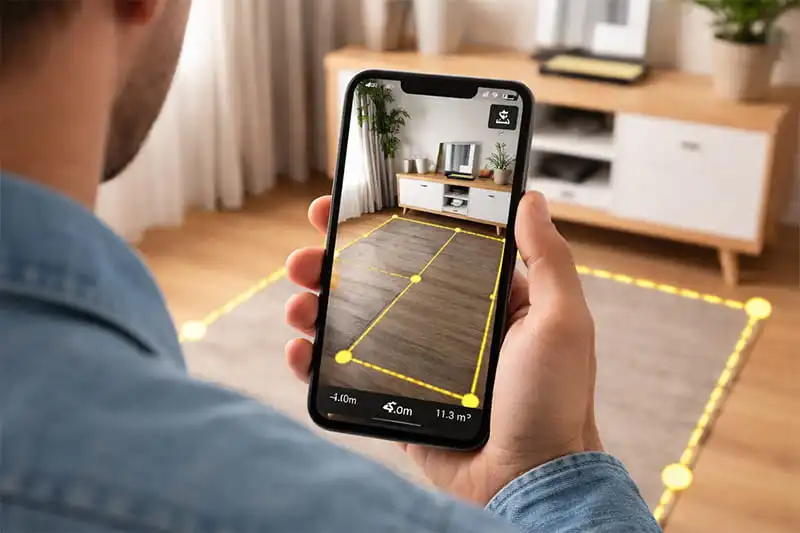
A few years ago, if you wanted to measure someone’s height, you probably needed a measuring tape and a wall. Today, things are very different. With the rise of smartphone technology, you can estimate height directly on your phone using height-measurement apps.
Many of these tools rely on AR, camera sensors, and LiDAR technology to calculate height in seconds. I’ve personally experimented with several of these apps—sometimes to check my own height and sometimes to measure objects around the house—and it’s impressive how quickly a phone can turn into a measuring tool.
Interestingly, these apps are not only used for measuring people. Some forestry enthusiasts and students also use them to measure tree height, especially when they need a quick estimate in the field.
How to Measure Height Using a Mobile App?
Using a height-measuring app is usually straightforward once you understand how these tools calculate distance and angles through your phone’s camera and sensors. Most apps follow a similar process, whether they rely on AR scanning or camera-based estimation. From my own testing, the key is to take a moment to set up the scene properly before measuring. A steady phone and good lighting can make a noticeable difference in the result.
- Install and open a measurement app: Start by installing a reliable height-measuring app from the Google Play Store or Apple App Store. Once you open the app, it will usually ask for camera access because the measurement process depends on the camera detecting surfaces and objects.
- Stand the person or object against a clear background: For the most consistent results, ask the person to stand upright on a flat surface, ideally against a wall. This helps the app detect the floor and identify the base point of the measurement. If you’re measuring an object, make sure the bottom edge is clearly visible.
- Position your phone at a comfortable distance: Step back enough so the entire height of the person or object fits inside the camera frame. Most apps need to see both the bottom and the top point to calculate height correctly.
- Scan the ground or reference surface: Many AR-based apps will ask you to slowly move the phone around the floor so the software can recognize the surface. This step allows the app to establish a reference point for the measurement.
- Mark the starting point (base): Tap on the bottom point, usually where the feet meet the floor or where the object touches the ground. This tells the app where the measurement should begin.
- Mark the top point: Next, move the camera upward and tap on the highest visible point, such as the top of a person’s head or the top edge of the object. The app will then calculate the vertical distance between the two points.
- Review the measurement: Within a second or two, the app will display the estimated height on the screen. Some apps also allow you to save the measurement, switch units (feet or centimeters), or take a screenshot for later reference. In my experience, repeating the measurement once or twice can help confirm the result.
Advantages
Limitations
At the same time, even measuring height manually with a tape is not completely error-free. If you want more accurate results, it’s worth learning the correct way to measure your height at home. Small mistakes can occur if the person is not standing straight, the tape is slightly tilted, or the head position is not marked correctly against the wall.
Because of this, whether you use an app or a traditional tape, taking careful measurements and repeating the process once or twice usually leads to more reliable results.
Now that you understand how height measurement apps work and how to use them properly, let’s look at some of the most widely used apps available for Android and iPhone.
10 Best Height Measurement Apps
Below is a researched list of height-measurement apps commonly used on Android and iPhone. I reviewed their official descriptions, user feedback, and ratings, and also personally tested some of these apps to understand how they perform in real-world situations, so you can see what each app does well—and where it may fall short.
1. AR Ruler App
Platform: Android & iPhone
Price: Free / Paid version
Google Play Rating: around 4.3 / 5
App Store Rating: around 4.8 / 5
AR Ruler App is one of the most widely used augmented-reality measurement tools. It turns your smartphone camera into a digital tape measure, allowing users to measure height, distance, area, and object dimensions directly on the phone.
The app works by detecting a flat surface through the camera and then letting you mark two points to calculate the measurement. It can also scan rooms and generate simple floor plans, which is useful for home design or furniture planning.
Advantages
Limitations
Verification links:
- https://play.google.com/store/apps/details?id=com.grymala.aruler
- https://apps.apple.com/us/app/ar-ruler-app-tape-measure/id1326773975
2. Measuring Tape+ Measure AR App
Platform: iPhone & iPad
Price: Free / Paid version
Ratings: Around 4.5 / 5
Measuring Tape+ is an AR-based tool that uses your iPhone’s camera to estimate measurements in real time. Instead of using a physical tape, you can point your phone at an object or space and mark the start and end points on the screen to calculate dimensions, including height.
Along with basic measurements, the app includes several practical tools such as surface area calculation, a leveling feature, a height tool, and a simple on-screen ruler. It also keeps a record of your previous measurements, which can be helpful if you need to revisit or compare results later.
User feedback is mostly positive, particularly for quick everyday use. Many users find it convenient for measuring furniture, rooms, or small objects without needing additional tools.
Advantages
Limitations
3. Tape Measure
Platform: iPhone & iPad
Price: Free / Paid version
App Store Rating: 4.6 / 5
Tape Measure is an AR-based measurement app that uses your phone’s camera and ARKit technology to estimate distances, height, and object dimensions. You can scan your surroundings and place points on the screen to measure objects, rooms, or surfaces without using a physical tape measure.
The app also includes multiple tools such as a ruler, height measurement tool, bubble level, and even floor plan features, allowing you to measure both simple objects and larger spaces. Some versions also support 3D room scanning, which can generate a basic layout of the area.
User feedback is generally positive, especially for convenience and having multiple tools in one app. Many users like using it for quick measurements when a physical tape is not available.
Advantages
Limitations
4. Apple Measure App
Platform: iPhone (built-in)
Price: Free (comes preinstalled on iOS)
App Store Rating: around 3.1 / 5
Apple’s Measure app is a built-in tool that uses ARKit and LiDAR sensors on newer iPhones to measure objects and people. It can automatically detect a person standing in the camera frame and display their height almost instantly. Because the app is integrated into iOS, it usually runs smoothly and does not require any additional setup.
User feedback is generally mixed. Many users appreciate that the Measure app is built directly into iOS and provides a quick way to estimate measurements without installing additional tools. However, some reviews indicate that results can vary depending on the device and measuring conditions.
Advantages
Limitations
5. Smart Measure
Platform: Android
Price: Free / Paid version
Google Play Rating: about 2.9 / 5
Smart Measure works differently from AR apps. Instead of scanning surfaces, it calculates height using trigonometry and camera angles. The app first measures the distance to the object and then calculates its height based on the camera angle.
This approach is especially useful for measuring tall objects such as buildings, poles, or trees, where AR apps sometimes struggle.
Advantages
Limitations
6. AR Plan 3D
Platform: Android & iPhone
Price: Free / Paid version
Google Play Rating: about 3.7 / 5
App Store Rating: about 4.4 / 5
AR Plan 3D is primarily designed for room measurement and floor-plan creation, but it can also measure height, width, and distance using AR and LiDAR scanning. The app lets you walk around a room while the camera captures dimensions and builds a digital layout.
Advantages
Limitations
7. ImageMeter – Photo Measure
Platform: Android
Price: Free / Paid version
Google Play Rating: around 3.2 / 5
ImageMeter is a measurement app designed to add measurements directly onto photos. Instead of measuring in real time with AR, you first take a picture and then annotate the image with distances, angles, and height measurements. This makes it useful for construction planning, interior design, and measuring objects that are hard to reach. This app is popular among builders, architects, and DIY users.
Advantages
Limitations
8. EasyMeasure – Camera Ruler
Platform: iPhone & iPad
Price: Free / Paid version
App Store Rating: about 4.3/ 5
EasyMeasure is a camera-based measuring app that estimates the distance and height of objects through your phone’s camera view. You simply point your phone toward an object, and the app calculates how far away it is, which can then be used to estimate height.
This type of tool is commonly used to estimate the height of buildings, trees, or objects that cannot easily be measured with a tape measure.
Advantages
Limitations
9. Moasure
Platform: Android & iPhone
Price: Free / Paid version
App Store rating: around 4.1 / 5
Google Play rating: NA
Moasure is a unique measurement tool that relies on motion sensors instead of AR scanning. By moving the phone from one point to another, the app calculates distances, heights, and angles. It can also measure complex shapes and irregular spaces. Some versions also integrate with dedicated measurement hardware for higher precision.
Because of this approach, Moasure can measure long distances (up to hundreds of meters), which is useful for outdoor projects.
Advantages
Limitations
10. Tape Measure – Measurement Ruler
Platform: Android
Price: Free / Paid version
Google Play Rating: around 4.4 / 5
Tape Measure – Measurement Ruler is an AR-based app that uses your phone’s camera to measure distances, surfaces, and room dimensions in real time. Instead of using a physical tape, you can move your phone around a space and mark points on the screen to calculate measurements.
In addition to basic distance and height estimation, the app can also calculate surface area, which is useful for tasks like flooring, painting, or space planning. For more advanced use, the paid version allows you to export the generated measurement diagrams in formats such as PDF, DXF, and PNG, making it practical for sharing or professional use.
User feedback is generally positive, especially for measuring rooms and surfaces quickly without tools. Many users find it helpful for planning layouts or estimating space. In several user reviews, people mention that the app performs well for general measurements but can become less reliable if the camera loses tracking or if the environment lacks clear visual reference points.