How to Create Celebrity Height Comparison Videos With AI Voiceover
Celebrity height comparisons are inherently visual, making them a good fit for short-form videos, YouTube content, and social media posts. A well-made celebrity height comparison can quickly show who is taller, how large the difference is, and how two or more familiar faces compare side by side.
With a simple chart, a short script, and an AI voiceover, you can turn that information into an engaging video without recording your own narration.
What Makes a Celebrity Height Comparison Video Interesting?
People often search for celebrity heights because numbers alone can be difficult to visualize. Saying that one celebrity is 180 cm and another is 165 cm tells you there is a 15 cm difference, but seeing both figures side by side makes that difference much easier to understand.
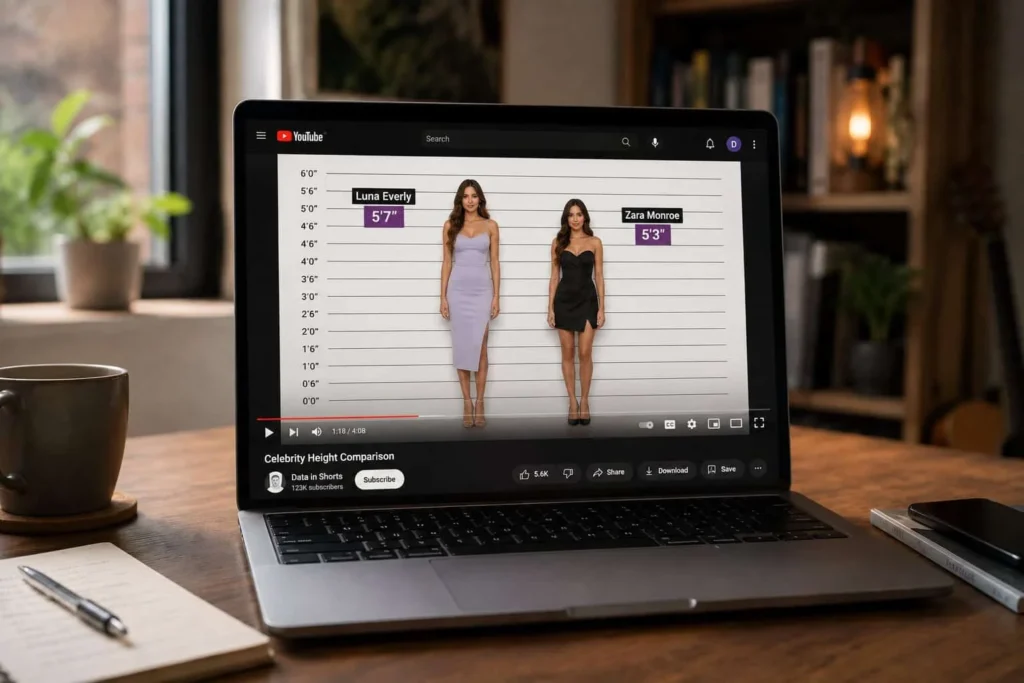
A celebrity height comparison chart provides a visual foundation. You can display several celebrities on the same scale, label their heights in feet and inches or centimeters, and highlight the difference between them.
For example, a video could compare three actors, two musicians, or a celebrity with a professional athlete. The key is to choose people whose heights create an interesting comparison rather than simply filling the screen with names.
Start With Accurate Celebrity Heights
Before creating the video, gather reliable height information for each person. Celebrity heights can vary between sources, so avoid presenting an uncertain measurement as an exact fact.
Create a simple list containing each celebrity’s name, listed height, and measurement unit. Then convert the values into a consistent format. If you are comparing people from different sources, using both centimeters and feet/inches can make the information easier for an international audience to follow.
This is also where a celebrity height chart or comparison tool can save time. A visual chart allows you to spot the celebrity height difference immediately and gives you an asset that can be adapted for video.
Choose a Strong Comparison
Not every combination will make an interesting video. Look for comparisons that answer a question viewers are likely to have.
You could create a male celebrity height comparison featuring several well-known actors, or focus on a female celebrity height comparison involving singers and actresses. Another option is to compare celebrities who are frequently photographed together but have noticeably different heights.
Keep the first few seconds focused on the comparison. Instead of opening with a long introduction, show the celebrities and give viewers an immediate reason to keep watching.
Turn the Comparison Chart Into a Video
Once you have the data, convert the chart into a simple visual sequence. You can reveal celebrities one at a time, move from shortest to tallest, or place two people side by side and show the exact height difference.
Short videos work especially well when every scene adds new information. For example:
Taylor Swift — 5’ 9¼”
Ariana Grande — 5′ ½ “
Height difference — 8¾”
The exact figures should always be checked against your chosen sources before publishing.
You can also add labels, scale markers, transitions, and captions so viewers can understand the comparison even with the sound turned off.
Write a Short Voiceover Script
A voiceover can make celebrity height comparison videos feel more like finished content rather than a collection of images.
Keep the script conversational and focused on the information shown on screen. For a short video, you might introduce the comparison, mention each person’s height, and finish by explaining the difference.
For example:
“Taylor Swift is listed at 5 feet 9¼ inches, while Ariana Grande is around 5 feet tall. That puts their height difference at roughly 8¾ inches.”
Avoid reading every piece of information visible on the screen. The narration should complement the visuals, not repeat them word for word.
Add a Voiceover With an AI Voice Generator
If you don’t want to record your own voice, an AI voice generator can convert your written script into natural-sounding speech. This is useful for creators who want consistent narration across a series of videos without setting up a microphone or recording multiple takes.
Choose a voice that matches the subject and keep the delivery clear and measured. Celebrity comparison videos usually benefit from a natural, informative style rather than an overly dramatic delivery.
After generating the audio, place it alongside the comparison visuals and adjust the timing so names, heights, and key differences appear when they are mentioned. AI voiceover tools can also help creators produce consistent narration across Shorts, YouTube videos, and other social content.
Make the Video Easy to Follow
You don’t need complex editing to create effective celebrity height comparison videos.
Use a consistent scale, readable labels, and enough screen time for viewers to process each height. Keep the most important comparison visible while it is being discussed, and use captions for viewers watching without sound.
It is also worth checking your numbers and sources before publishing. A polished animation cannot compensate for inaccurate height information.
Final Thoughts
A celebrity height comparison is a straightforward way to turn useful height data into engaging visual content. Start with reliable measurements, build a clear chart comparing celebrity heights, choose an interesting group of people, and turn the comparison into a short, focused script.
Adding an AI voiceover can take the finished piece a step further, especially if you want to publish regularly without recording narration yourself. When the data, visuals, script, and voice all support the same story, even a simple height comparison can become useful and engaging video content.